


|
Name |
OpenClaw |
|---|---|
|
Google Play Link |
GET IT ON
Google Play
|
|
Category |
Tools |
|
Developer |
BrutalStrike |
| Last version | 2.1.570 |
|
Updated |
|
|
Compatible with |
Android 6.0+ |
Introduction to OpenClaw APK
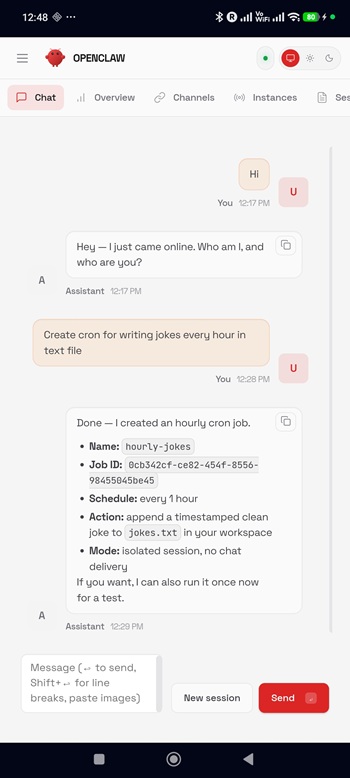
OpenClaw is a mobile app, not a game. It fits the utility and developer tools category, with a focus on AI assistance and coding work on Android. The app brings an AI chat assistant and a command-line coding agent into one place, so users can handle conversations, coding tasks, and automation from a phone instead of jumping between separate tools.
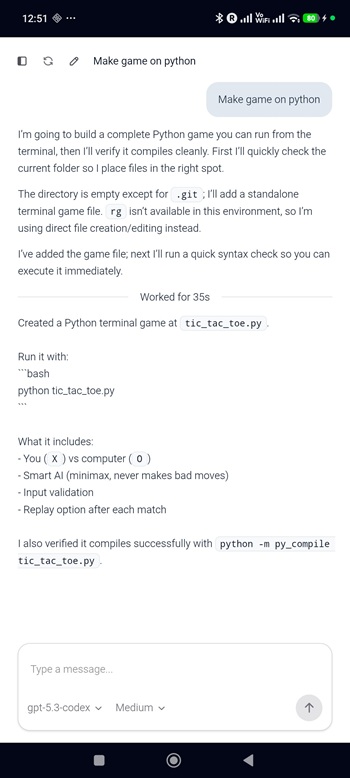
Its main use is helping people work with AI in a more practical way on mobile. You can chat with the assistant, manage sessions, use agent-based workflows, and run more advanced tasks through a full dashboard. It also includes OpenAI Codex CLI, which is built for code-related jobs such as reading project files, writing code, creating files, and running commands inside an embedded Linux setup.
One of the biggest draws is how much it packs into a single Android app. OpenClaw includes multi-agent routing, skills, Canvas support, and a full control panel for handling different tasks. The embedded Linux environment adds real value because it comes with Node.js, npm, and SSL certificates, which makes the app feel closer to a compact workstation than a basic chatbot. For users who like having serious tools on hand, that setup can be surprisingly handy.
There is also a clear convenience factor here. The app runs its tools in one shared environment and uses one OpenAI OAuth login for both agents. That cuts down setup friction and keeps things simpler for people who want to move between AI chat and coding work without reconfiguring everything. Since it runs natively on ARM64 and does not require root or Termux, it feels more accessible than many mobile developer setups that ask users to patch things together first.
The advantages are strongest for developers, tinkerers, and advanced users who want portable AI tools on Android. It can be useful for checking code on the go, testing quick scripts, managing small workflows, or using AI help away from a laptop. It may also suit users who like experimenting with agent systems and command-line tools from a phone. In the right hands, it can save time and reduce the need to carry a full computer for lighter tasks.
There are a few limits to keep in mind. OpenClaw sounds powerful, but that also means it may feel technical for casual users who only want a simple chatbot. A phone screen is still a phone screen, so long coding sessions and complex file work may feel cramped. Background services and an embedded Linux environment can also demand more from the device than a standard app. For users who mainly want quick chats and nothing else, this setup may be more than they need.
FAQs OpenClaw
What is OpenClaw used for?
+
OpenClaw is an Android utility app that combines an AI assistant with a coding agent. It is used for chatting with AI, managing tasks, handling sessions, and running code-related commands on mobile.
Does OpenClaw APK work as a coding tool on Android?
+
Yes. It includes OpenAI Codex CLI, which can read code, write files, create code, and run commands inside an embedded Linux environment on the device.
Who should use OpenClaw?
+
OpenClaw is best for developers, advanced users, and people who want AI tools with command-line features on Android. It is most useful when you need more than a simple chatbot.
Does OpenClaw need root or Termux to run?
+
No. Based on the provided reference, it does not require root access and does not depend on Termux, which makes setup easier for Android users.
What are the downsides of OpenClaw APK?
+
The app can feel technical for beginners, and its advanced tools may be harder to use on a small phone screen. It may also use more device resources than a standard chat app.
Discover More Interesting Apps
-
 Mod
Mod
PigeonCast
v3.6.6
63.23 Mb
Updated -
Mod
Proton VPN
v5.20.39.0
72.00 Mb
Updated -
Mod
Zero Cleaner
v26.9.1
8.09 Mb
Updated -
H4X Macro Game Booster Pro
v3.6.8
11.00 Mb
Updated -
HaloVPN
v19.6.2
99.12 Mb
Updated -
Mod
Cool VPN
v1.0.450
88.00 Mb
Updated -
TikFinity
v2.6.9
89.22 Mb
Updated -
gCMOB
v3.4.1
215324690
Updated -
Uptodown
v7.37
14 MB
Updated -
Mod
ShareBox
v1.3.8
76.08 Mb
Updated










Share Your Thoughts